

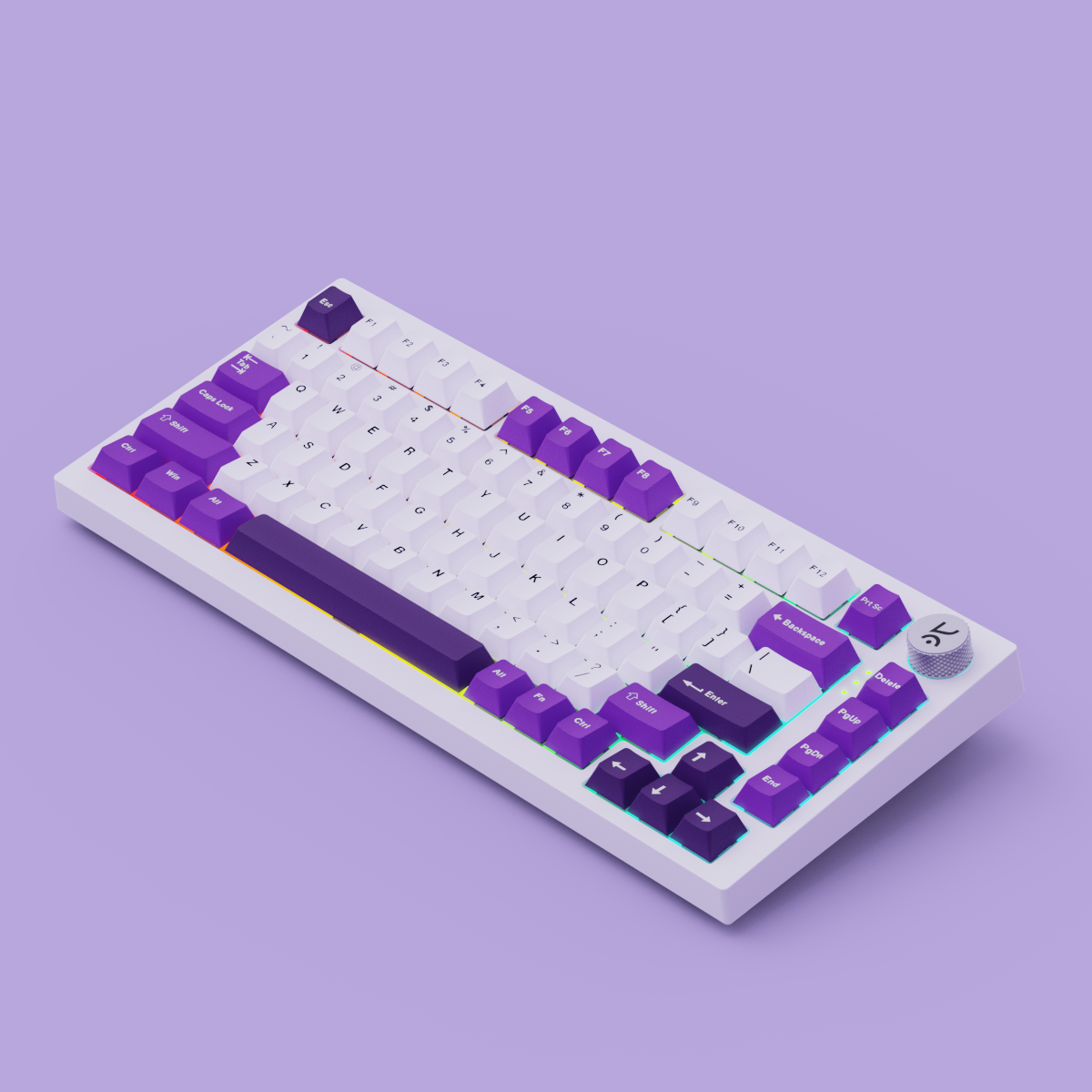
Best 75% Mechanical Keyboards in India (2026): Expert Guide for Gaming, Coding & Desk Setups

Quick Answer: A 75% mechanical keyboard is a compact keyboard layout with approximately 80 keys, retaining the function row (F1–F12), dedicated arrow keys, and navigation cluster, while saving up to 30% desk space compared to a full-sized board. This makes it the modern sweet spot for Indian gamers, coders, and creators who demand performance and space efficiency.
Why the 75% Mechanical Keyboard is the Modern Sweet Spot
Indian buyers are increasingly choosing compact mechanical keyboards that don’t compromise on essential keys. The 75% keyboard India trend is driven by the need for more mouse space, cleaner desk setups, and a balance between gaming and productivity. Unlike 60% or 65% keyboards, the 75% layout retains the F1–F12 function row and dedicated arrow keys, making it ideal for coding shortcuts, gaming macros, and office navigation.
What is a 75% Mechanical Keyboard?
Direct Answer: A 75% mechanical keyboard combines all essential keys—function row, arrows, and navigation cluster—into a layout that's about 30% smaller than a full-sized board. You get around 80–84 keys in a tight, efficient footprint, making it the best keyboard for gaming and coding on Indian desks where space is at a premium.
| Layout | Key Count (approx.) | Width | Retained Keys |
|---|---|---|---|
| 75% | 80–84 | ~32cm | Function row, arrows, nav cluster |
| 65% | 67–71 | ~30cm | Arrows, nav keys (no function row) |
| TKL | 87–88 | ~36cm | Function row, arrows, nav cluster |
Who Should Choose a 75% Layout?
- Gamers: Need more mouse space for flick shots and fast movement? 75% is perfect for FPS, MOBA, and battle royale titles. Dedicated arrows and F-keys mean no awkward combos mid-game.
- Coders & Developers: Shortcut-heavy workflows (VS Code, JetBrains, terminal navigation) benefit from the full function row and navigation cluster.
- Office Users & Creators: Excel, video editing, and design apps rely on F-keys and arrows, making 75% layouts more productive than 65% boards.
- Desk Minimalists: Want a clean, organized workspace without sacrificing typing comfort? 75% is the desk space saving keyboard that still feels familiar.

Key Features to Compare First: Gasket Mount, Hot-Swappable Switches, RGB, and More
- Gasket Mount Mechanical Keyboard: Uses silicone or foam gaskets between the plate and case for a softer, quieter, and more premium typing feel. Reduces finger fatigue and adds a satisfying ‘thock’ sound profile.
- Hot Swappable Mechanical Keyboard: Lets you swap switches (linear, tactile, clicky, or even magnetic) without soldering. Perfect for modders or anyone who wants to experiment with feel and sound.
- RGB Gaming Keyboard: Per-key or zone RGB lighting isn’t just for looks—it helps with low-light gaming and adds personality to your setup.
- Dedicated Volume Knob: Instantly control audio without leaving your game or workflow.
- Multi-Device Connectivity: Bluetooth, 2.4GHz, and wired options let you use the same keyboard for PC, Mac, and even tablets.
- Keycap Quality & Legend Visibility: Look for double-shot or dye-sub PBT keycaps for durability and crisp legends that won’t fade.
The Budget-Friendly Path: What to Expect at Each Price Tier
- Entry-level (₹3,000–₹5,000): Basic hot-swap, single-color or basic RGB, plastic case, limited software. Good for first-time buyers or casual gamers. (Check current listings for exact pricing before purchase.)
- Mid-range (₹5,000–₹9,000): Gasket mount, per-key RGB, knob, better keycaps, multi-device support. Ideal for daily drivers, coders, and gamers wanting more comfort.
- Premium (₹10,000+): Magnetic Hall Effect switches (rapid trigger), metal case, advanced software, deep modding. Aimed at enthusiasts and competitive FPS gamers.
Top 75% Mechanical Keyboards in India (2026)
- Kreo Hive 75 Series (V2 & HE): Gasket mount, hot-swap, vibrant RGB, dedicated volume knob, and tailored for Indian setups. Available in both traditional and Hall Effect (HE) magnetic switch versions. See Kreo Hive 75
- Aula F75: Budget gasket-mount option, praised by Indian buyers for value and comfort.
- Keychron K2/Q1 Max: Cross-platform productivity, Mac/Windows support, solid build, and hot-swap options.
- MCHOSE G75, Royal Kludge RK75: Affordable hot-swap choices with basic RGB and knob.
- URX Core 75 HE, Monsgeek M1 V5: Magnetic Hall Effect switches for rapid trigger, ideal for FPS and competitive gaming.

Checklist: Essential Buyer Features for 75% Mechanical Keyboards
- Gasket mounting for soft, quiet typing
- Hot-swappable switches for easy customization
- Per-key RGB lighting with software control
- Dedicated arrow keys and function row
- Volume knob or media controls
- Multi-device (wired, Bluetooth, 2.4GHz)
- High-quality PBT keycaps
- Software for macros and lighting
Trade-Offs and Considerations: Sound, Modding, and Desk Space
While the best 75% mechanical keyboard offers a near-perfect balance, there are trade-offs:
- Sound Profile: Gasket mounts and foam dampening add a deep, muted sound, but some budget models can sound hollow. Check for community sound tests on YouTube or Reddit.
- Modding Potential: Hot-swap PCBs make switch and keycap swaps easy. Premium models (like Kreo Hive 75 HE) allow for advanced mods such as lubing, foam layering, or even rapid trigger tuning.
- Desk Space: 75% is compact, but if you need a numpad for heavy Excel use, consider TKL or full-size. For pure gaming, 65% may suffice—but you’ll lose the F-row.
Kreo Hive 75 Series in Focus: Why It Fits Indian Buyers
The Kreo Hive 75 series is designed for Indian gamers, coders, and creators who want a compact mechanical keyboard with no compromises. You get:
- Gasket-mounted plate for a soft, premium typing feel
- Hot-swappable switches (compatible with both 3-pin and 5-pin)
- Per-key RGB with vibrant effects and easy software
- Dedicated volume knob and media controls
- Multi-device support (wired, Bluetooth, 2.4GHz)
- Available in both standard and Hall Effect (HE) magnetic switch versions for rapid trigger gaming
Explore more at the Kreo Tech homepage, browse all Kreo products, or compare the full Kreo mechanical keyboards collection.

How to Set Up and Get the Most from Your 75% Mechanical Keyboard
- Install the keyboard’s software for full RGB and macro customization
- Experiment with different switches if your board is hot-swappable
- Use the volume knob for quick audio adjustments during gaming or calls
- Try foam or lube mods for a deeper sound profile (check YouTube for tutorials)
- Keep your workspace tidy—your mouse and keyboard should both have room to shine
Frequently Asked Questions
- What makes a 75% mechanical keyboard better for gaming and productivity?
- It balances compactness with full functionality—keeping the F-row, arrows, and navigation keys for shortcuts and macros, while freeing up desk space for mouse movement and cleaner setups.
- Do 75% keyboards have dedicated arrow and function keys?
- Yes, the 75% layout retains both, making it superior to 65% boards for coding, gaming, and office work.
- How does a 75% keyboard compare to 65% and TKL layouts?
- 75% keeps the function row and arrows in a compact footprint; 65% drops the F-row; TKL is wider but omits the numpad. See the comparison table above.
- What is gasket mounting, and why does it matter in a keyboard?
- Gasket mounting uses soft materials to cushion the switch plate, resulting in a softer, quieter, and more comfortable typing experience.
- Are hot-swappable switches worth it for Indian buyers?
- Absolutely—hot-swap PCBs let you change switches without soldering, making it easy to experiment with different feels and sounds or replace faulty switches.
- Which 75% mechanical keyboards are best for modding?
- Look for hot-swappable models with gasket mounts, like the Kreo Hive 75, Keychron Q1 Max, or Monsgeek M1 V5 for advanced mods.
- Can I use a 75% keyboard for both Windows and Mac?
- Most modern 75% keyboards, including Kreo Hive 75 and Keychron K2/Q1 Max, support both OSes via software or hardware toggles.
- Is the Kreo Hive 75 good for both typing and gaming?
- Yes, it’s designed for all-day typing comfort and fast gaming response, especially with the HE magnetic switch option.
- What should I look for in a budget 75% mechanical keyboard?
- Prioritize hot-swap support, basic RGB, and a solid build. Gasket mount is a bonus at lower price points.
- How do I set up and customize RGB lighting on a 75% keyboard?
- Install the manufacturer’s software to access per-key RGB effects, or use onboard shortcuts for quick changes.
The Bottom Line: Which 75% Mechanical Keyboard Should You Buy in 2026?
For Indian buyers seeking a compact keyboard with no compromise on features, the Kreo Hive 75 series stands out with its gasket mount, hot-swappable switches, vibrant RGB, and dedicated volume knob—all at a competitive price. Other options like Aula F75 and Keychron Q1 Max are strong, but Kreo’s local focus and feature set make it a top contender for gaming, coding, and everyday productivity.
Ready to Upgrade? Shop the Kreo Hive 75 Series Now
Don’t settle for cramped layouts or missing keys. Explore the Kreo Hive 75 and experience the best 75% mechanical keyboard for Indian gaming and productivity in 2026. For more options, visit the Kreo mechanical keyboards collection or all Kreo products.
Beyond Razer: Top Gaming Mouse Alternatives in India for 2026 – Style, Speed & Value